Tablets
Best USB-C Hub for iPad and Android Tablets (2026): HDMI, SD and Charging
A USB-C hub turns a tablet’s single port into HDMI, SD card slots, USB-A and a charging input. But not every tablet can send video to a monitor, and pass-through charging has a catch. Here’s what works with which tablet, and three hubs to buy.
As an Amazon Associate, Before You Cart earns from qualifying purchases. Read our affiliate disclosure.
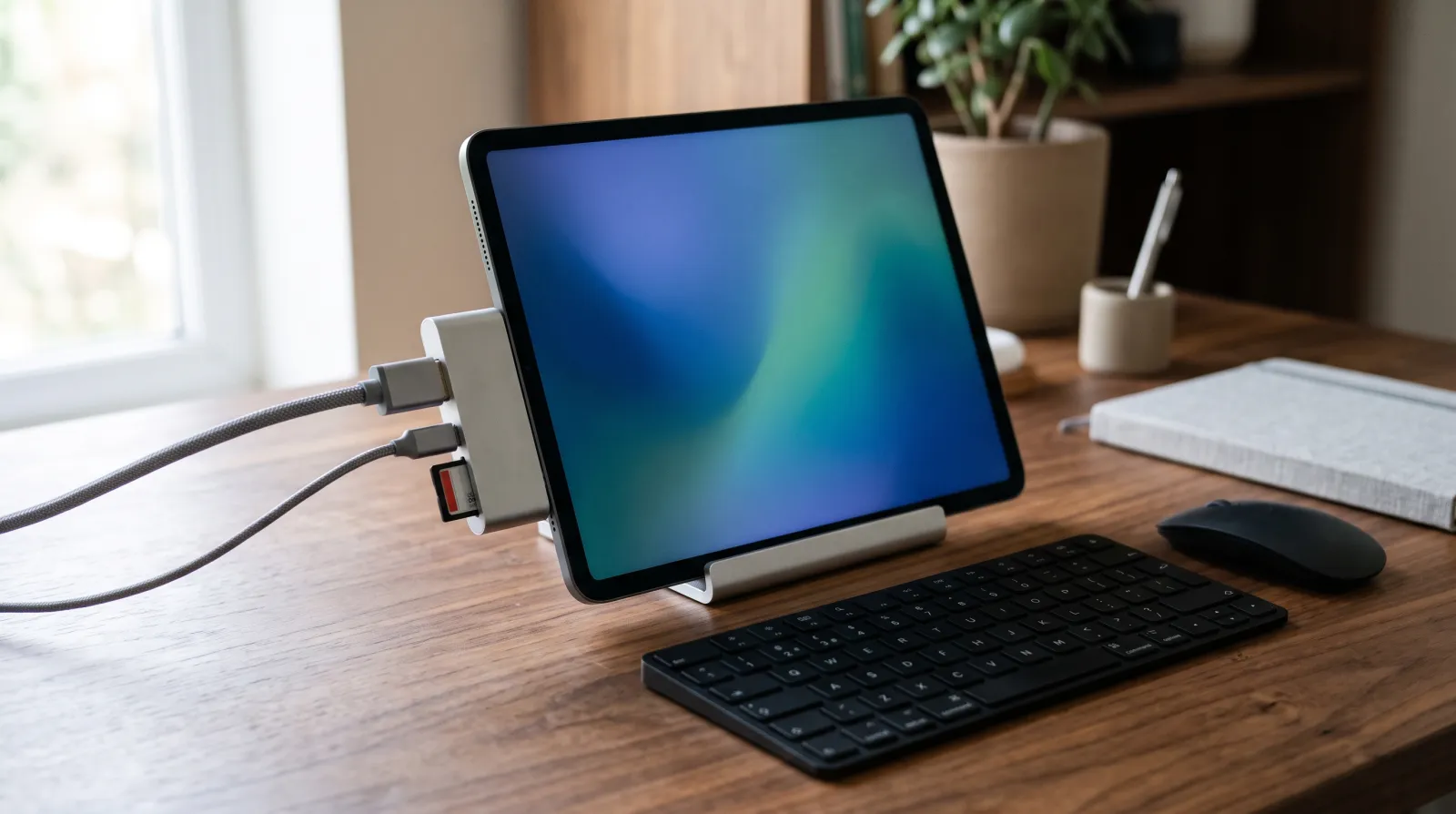
The short answer
- Video out works on: every current iPad, Galaxy Tab S models with DeX (not the FE or Lite models), and the Alexa Tablet 12 Pro. See the full list.
- Best hub for most tablets: Anker 555 8-in-1, with 4K 60Hz HDMI, SD and microSD (about $34 at Anker, Nov 2026).
- Cheapest: Anker 341 7-in-1 (about $24 at Anker, Nov 2026), but HDMI tops out at 4K 30Hz.
- For iPad Air and Pro: Satechi Mobile Pro Hub SD, a short hub with a headphone jack.
- To charge through the hub: use a 45W or larger USB-C charger. A tablet’s 20W charger isn’t enough.
Which tablets support HDMI out over USB-C
A hub can only pass video if the tablet’s USB-C port sends it. Check this before you buy, because a hub on a tablet without video output still adds USB and SD slots, but the HDMI port does nothing.
| Tablet | USB-C port | Video out |
|---|---|---|
| iPad 11-inch (A16) | USB 2.0 (480Mb/s) | Yes, one display up to 4K 60Hz |
| iPad mini (A20 Pro) | USB 3 (10Gb/s) | Yes, one display up to 4K 60Hz |
| iPad Air (M4) | USB 3 (10Gb/s) | Yes, one display up to 6K 60Hz |
| iPad Pro (M5) | Thunderbolt / USB 4 | Yes, up to 6K 60Hz or 5K 120Hz |
| Galaxy Tab S7 to S11 series, S6, S5e, S4, A11+ | USB-C | Yes, Samsung DeX over HDMI |
| Galaxy Tab S9 FE / FE+, S10 FE / FE+, S10 Lite | USB-C | No HDMI output, per Samsung |
| Alexa Tablet 12 Pro | USB 3.2 Gen 1 (5Gbps) | Yes, DisplayPort listed |
| Alexa Tablet 11 and 8 (2026) | USB-C 2.0 | Not confirmed by any source we found |
Scroll sideways to see every column.
iPad details are from Apple’s spec pages, Galaxy details from Samsung’s DeX support page, Alexa Tablet 12 Pro details from shawwp’s spec sheet, and Alexa Tablet 11 and 8 details from GSMArena. Apple says iPad charges while connected to a display when you plug the charger into the adapter’s spare port. Samsung’s DeX also runs on the tablet screen alone, so a hub is only needed for an external monitor or extra ports.
No hub maker lists the Alexa Tablet 12 Pro as tested yet. Because its port lists DisplayPort output, a standard USB-C HDMI hub should work, but check the return policy. For the 12 Pro’s other add-ons, see our 12 Pro accessories guide.
What to look for in a tablet USB-C hub
- HDMI at 4K 60Hz, not 30Hz. 30Hz looks choppy when you scroll or move a mouse. It’s fine for slides and movies on a TV.
- A USB-C Power Delivery input. Without one, the hub drains the tablet. With one, you can charge while you work (see the charging catch).
- SD and microSD slots if you move photos from a camera or drone. All three picks have UHS-I card readers.
- USB-A ports for a wired keyboard, mouse or flash drive.
- Short cable vs plug-in body. Hubs that plug straight into the tablet are tidy but can clash with a thick case. A hub on a short cable works with any case.
- Host speed. Some hubs need a faster port than the base iPad’s USB 2.0. Satechi lists USB 3.1 Gen 2 or faster for its Mobile Pro Hub SD.
Best USB-C hubs for tablets
Anker 555 USB-C Hub (8-in-1)
For: hooking an iPad, Galaxy Tab or Alexa Tablet 12 Pro to a monitor or TV, with card slots and USB ports to spare.
HDMI 2.0 up to 4K 60Hz · USB-C PD input up to 100W (85W passed through) · USB-C data + 2 USB-A, 10Gbps · SD + microSD (UHS-I) · Gigabit Ethernet · 4.4 oz · model A8383 · about $34 at Anker (Nov 26, 2026; list $49.99)
Pros
- Smooth 4K 60Hz HDMI
- Fast 10Gbps USB ports
- Ethernet for hotel or office wired internet
Cons
- Needs a 45W+ charger to pass power to a tablet
- Larger than a tablet-only hub
Anker 341 USB-C Hub (7-in-1)
For: SD cards, a flash drive or a TV hookup on a budget, where 30Hz video is fine.
HDMI 1.4 up to 4K 30Hz · USB-C PD input up to 100W (85W passed through) · 2 USB-A at 5Gbps + 1 USB-C data at 480Mbps · SD + microSD (UHS-I) · iPadOS listed as supported · model A8346 · about $24 at Anker (Nov 26, 2026; list $39.99)
Pros
- Lowest price here
- Both SD and microSD slots
- Seven ports
Cons
- HDMI limited to 4K 30Hz
- Needs a 45W+ charger to pass power to a tablet
Satechi USB-C Mobile Pro Hub SD (ST-MPHSDM)
For: iPad Air, iPad mini and iPad Pro owners who want a short hub with a headphone jack for travel.
HDMI up to 4K 60Hz · USB-C PD charging up to 60W (Satechi recommends a 30W or larger charger) · USB 3.0 port · SD + microSD (UHS-I) · 3.5mm headphone jack · USB-C extension cable included for use with a case · needs a USB 3.1 Gen 2 or faster host · check the listing for today’s price
Pros
- 4K 60Hz HDMI
- 3.5mm headphone jack for wired headphones
- Extension cable so it works with a case
Cons
- Not for the base iPad (A16), whose port is USB 2.0
- Only one USB-A port
Pass-through charging: the catch
All three hubs have a USB-C charging input, but plugging in the charger that came with your tablet often isn’t enough. Anker says its 341 and 555 hubs can’t pass power through to tablets or phones from their original chargers, and asks for an adapter that supports 15V (45W). The hub also keeps about 15W for itself.
- Use a 45W or larger USB-C PD charger on Anker hubs. A 45W charger leaves about 30W for the tablet, enough for an Alexa Tablet 12 Pro (27W) or any iPad’s 20W rate.
- Satechi recommends 30W or more for its Mobile Pro Hub SD.
- Plug the charger into the hub, not the tablet. Apple’s setup guide does the same: the charging cable goes into the adapter’s extra port.
A charger we’ve already checked for tablets is the Anker Nano 45W; it’s covered in our Alexa Tablet 12 Pro charger guide. Working away from an outlet? A USB-C power bank can feed the hub’s charging port too; our tablet power bank guide lists ones with 45W or more.
SD cards, keyboards and mice
- SD cards: Engadget found the Alexa Tablet 12 Pro recognized a USB-C SD card reader and a flash drive without trouble. On the base iPad (A16), Apple lists the port at up to 480Mb/s, so large photo imports take longer than on an iPad Air or mini (10Gb/s).
- Keyboard and mouse on Galaxy tablets: Samsung says DeX works with a USB or Bluetooth mouse and keyboard, so a wired set in the hub’s USB-A ports gives you a desktop setup on a monitor.
- Bluetooth is simpler: a Bluetooth keyboard leaves the hub’s ports free and works away from the desk. Our tablet keyboard guide compares keyboards for iPad, Galaxy and Alexa Tablets.
The verdict
First check that your tablet outputs video: every current iPad does, as do Galaxy Tab S models with DeX (not the FE or Lite) and the Alexa Tablet 12 Pro. For most of those, the Anker 555 8-in-1 is the hub to get, with 4K 60Hz HDMI, card slots and fast USB. The Anker 341 saves money if 30Hz video is fine. iPad Air and Pro owners who travel should look at the Satechi Mobile Pro Hub SD for its headphone jack. Whichever you buy, power it with a 45W or larger USB-C charger so the tablet charges while you work.
Frequently asked questions
Can I connect my tablet to a monitor or TV with a USB-C hub?
Only if the tablet’s USB-C port outputs video. Current iPads do: the iPad (A16) and iPad mini support one 4K 60Hz display, and the iPad Air (M4) and iPad Pro (M5) up to 6K. Samsung lists HDMI output for the Galaxy Tab S4, S5e, S6, S7 through S11 series, Tab A11+ and Tab Active models. The Alexa Tablet 12 Pro’s USB-C port lists DisplayPort output.
Does the Alexa Tablet 11 or 8 support HDMI out?
We found no source that says so. GSMArena lists a USB-C 2.0 port on both and doesn’t mention video output, while the Alexa Tablet 12 Pro’s spec sheet lists DisplayPort. Don’t buy a hub for HDMI on the 11 or 8 unless Amazon confirms it.
Which Samsung tablets can’t use HDMI?
Samsung says the Galaxy Tab S9 FE, Tab S9 FE+, Tab S10 FE, Tab S10 FE+ and Tab S10 Lite are not compatible with HDMI output. A hub still adds USB-A and SD card slots on those models, but not a monitor.
Why won’t my hub charge my tablet?
Pass-through charging needs more power than a tablet’s own charger supplies. Anker says its 341 and 555 hubs won’t pass power through to tablets or phones from the charger that came with them, and recommends an adapter that supports 15V (45W). The hub also keeps about 15W for itself. Use a 45W or larger USB-C PD charger.
Can I use a USB keyboard and mouse through a hub?
Yes on Galaxy tablets: Samsung says DeX works with a USB or Bluetooth mouse and keyboard. Plug them into the hub’s USB-A ports. A Bluetooth keyboard skips the hub and keeps a port free; see our tablet keyboard guide for picks.
Do SD card readers work on tablets?
Yes on tablets that support USB storage. Engadget found the Alexa Tablet 12 Pro recognized a USB-C SD card reader and flash drive. Expect slower transfers on USB 2.0 tablets: Apple lists the iPad (A16) port at up to 480Mb/s, versus 10Gb/s on the iPad mini and iPad Air.
Sources
This guide is based on hub makers’ product pages and setup guides, Apple’s and Samsung’s support and spec pages, and published reviews. We have not tested these devices ourselves. Specs and prices were checked on November 26, 2026; check Amazon for today’s price.
- Anker: 341 USB-C Hub (7-in-1), A8346 (opens in a new tab)
- Anker: 555 USB-C Hub (8-in-1), A8383 (opens in a new tab)
- Satechi: Quick Start Guide, Mobile Pro Hub SD (ST-MPHSDM) (opens in a new tab)
- Apple Support: Connect iPad to a display with a cable (opens in a new tab)
- Apple: iPad 11-inch (A16) technical specifications (opens in a new tab)
- Apple: iPad mini (A20 Pro) technical specifications (opens in a new tab)
- Apple: iPad Air (M4) technical specifications (opens in a new tab)
- Apple: iPad Pro (M5) technical specifications (opens in a new tab)
- Samsung Support: Use Samsung DeX on your Galaxy tablet (Mar 2, 2026) (opens in a new tab)
- shawwp: Alexa Tablet 12 Pro specs (USB-C port, DisplayPort) (opens in a new tab)
- Engadget: Alexa Tablet 12 Pro review (Oct 15, 2026) (opens in a new tab)
- GSMArena: Amazon Alexa Tablet 11 (2026) specifications (opens in a new tab)
- GSMArena: Amazon Alexa Tablet 8 (2026) specifications (opens in a new tab)