Tablets
Amazon Kids Tablet 8 vs 11 (2026): Which Size for Your Child?
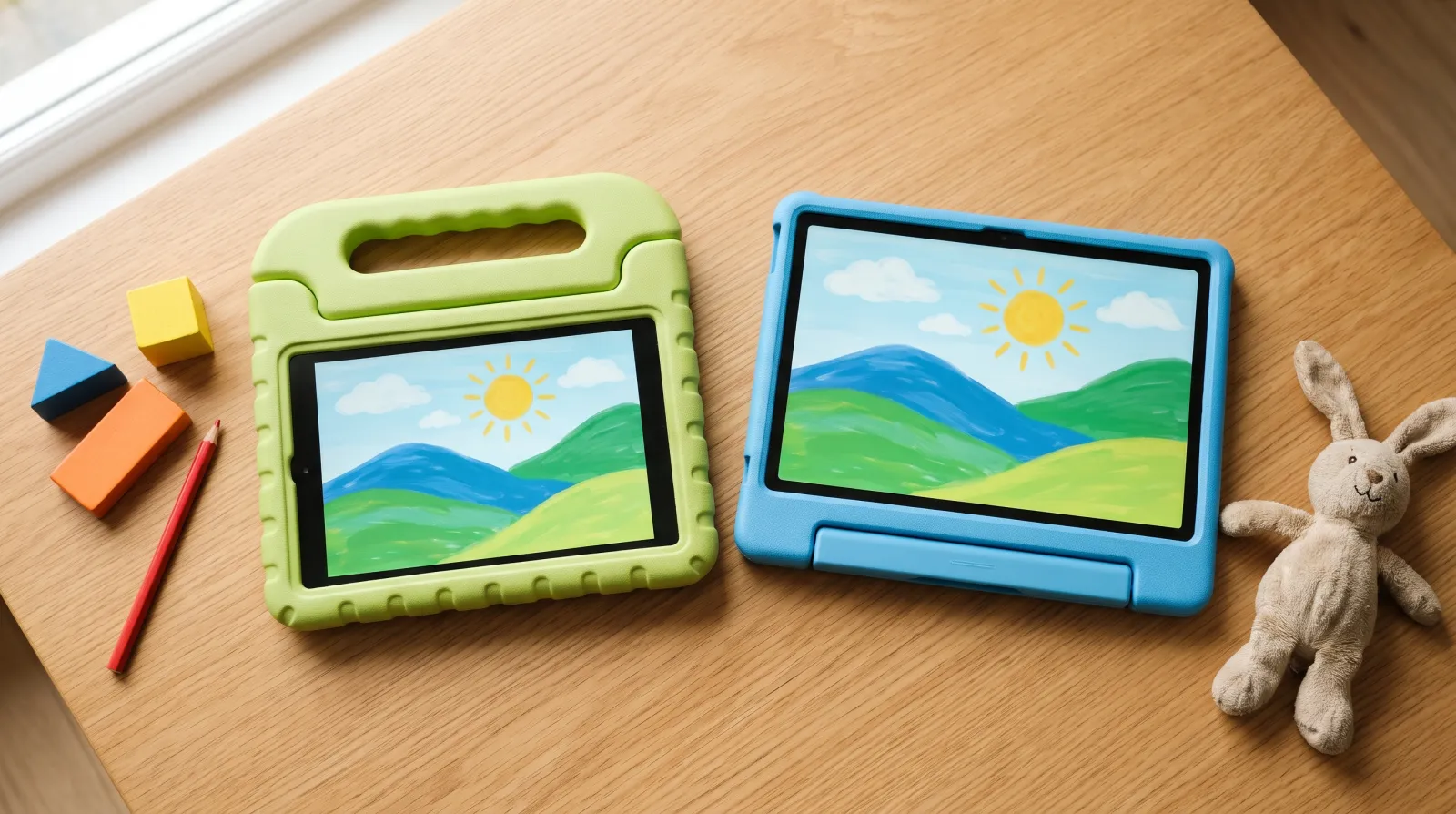
Both sizes come in two versions: a soft bumper for little kids and a slim hard case for school-age kids. That makes four boxes to choose from. Here’s what the extra $100 for the 11-inch buys, which case fits which child, and why the price gap is smaller this week.
As an Amazon Associate, Before You Cart earns from qualifying purchases. Read our affiliate disclosure.
The short answer
- Ages 3 to 5, mostly shows and simple games: Kids Tablet 8, ages 3–5. Lighter, cheaper, soft bumper. $229.99 list, $129.99 at Abt with a rebate through Nov 30, 2026.
- Ages 6 and up, or a child who draws, reads comics or games: Kids Tablet 11, ages 6–12. Sharper 2.5K screen, 8GB RAM, stylus support. $329.99 list, $199.99 at Abt through Nov 30.
- Young child, but you want it to last to age 10: Kids Tablet 11, ages 3–5. The big screen in the soft bumper.
- The age label is the case, not the hardware. Within each size, retail listings show the same screen, RAM and storage for both age versions. See the four versions.
What to look for
Amazon replaced its Fire Kids tablets in October 2026 with two sizes of Amazon Kids Tablet. Both run Android with parent-approved Google Play apps and come with a year of Amazon Kids+ (The Verge). If you are still choosing between this and an iPad or a Kindle, start with our best tablet for kids guide. This page answers one question: which size?
- Screen sharpness, not just size. The 11-inch screen has about 274 pixels per inch; the 8.7-inch has about 180 (our calculation from the listed resolutions). Picture books, comics and small text look clearly crisper on the 11.
- Weight in small hands. 0.73 lb vs 1.02 lb before the case (Abt). A preschooler holding it up in the car will notice.
- RAM for games. 4GB vs 8GB. The Verge says the 11’s extra RAM is for a better gaming experience. It also helps as apps get heavier over the years.
- Stylus. Listed for the 11 only.
- The case. Picked by the age version (3–5 or 6–12), not by the size. More on that below.
Kids Tablet 8 vs 11: specs side by side
Specs and prices are from Abt’s listings for all four versions, checked November 26, 2026. Launch prices are confirmed by Engadget and The Verge.
| Spec | Kids Tablet 8 | Kids Tablet 11 |
|---|---|---|
| Screen | 8.7″, 1340 × 800 (about 180 PPI) | 11″, 2560 × 1600 “2.5K” (about 274 PPI) |
| Processor | MediaTek 8-core, up to 2GHz | MediaTek 8-core, up to 2GHz |
| RAM | 4GB | 8GB |
| Storage | 64GB | 64GB |
| Battery | Up to 14 hours of video | Up to 15 hours of video |
| Weight (tablet only) | 0.73 lb | 1.02 lb |
| Size (tablet only) | 8.23 × 5.22 × 0.31 in | 9.97 × 6.49 × 0.27 in |
| Cameras | 8MP rear, 5MP front | 8MP rear, 8MP front |
| Stylus support | Not listed | Yes |
| Ports | 1 USB-C, no headphone jack | 1 USB-C, no headphone jack |
| Case options | Soft bumper (ages 3–5) or slim hard case (ages 6–12) | Soft bumper (ages 3–5) or slim hard case (ages 6–12) |
| Amazon Kids+ | 1 year included | 1 year included |
| Warranty | 1-year limited | 1-year limited |
| Price | $229.99 list; $129.99 at Abt with rebate to Nov 30, 2026 | $329.99 list; $199.99 at Abt with rebate to Nov 30, 2026 |
Scroll sideways to see every column.
PPI is our calculation from the listed resolution and screen size. Weight and size are for the bare tablet; the case adds to both.
The four versions: size × case
Each size is sold in two bundles. Engadget describes them as a soft bumper case with a handle for ages 3 and up, and a slim hard case with a folding kickstand for ages 6 and up. Abt’s listings show the same screen, RAM and storage for both versions of each size, so the age label mostly decides the case and how the tablet is pitched.
| Soft bumper (ages 3–5) | Slim hard case (ages 6–12) | |
|---|---|---|
| Kids Tablet 8 | Best for preschoolers. Lightest, cheapest, most drop-friendly. | For a 6 to 8 year old on a budget, or a small-handed child. |
| Kids Tablet 11 | For a young child you want to grow into the bigger, sharper screen. | Best for most school-age kids. Drawing, comics, homework apps. |
Scroll sideways to see every column.
The bumper is thicker and easier for small hands to grab; the slim case looks more grown-up and fits a school bag better. Both cases have a kickstand per Abt. If you buy the bumper version now, you can switch to a slimmer case later: our Kids Tablet accessories guide covers cases, headphones and chargers.
What the extra $100 buys
1. A much sharper screen
This is the biggest difference. The 11 packs about 50% more pixels per inch than the 8, on a screen with almost twice the area. On the 8, small text in comics, chapter books and web pages looks softer. For cartoons and simple games, a 4 year old won’t care. For a 9 year old reading graphic novels, the 11’s screen has a clear edge on paper.
2. Twice the RAM
4GB vs 8GB. Both use the same 8-core chip, so simple apps feel similar. The extra RAM matters for heavier games and for switching between apps, and it buys a little more life as apps grow over the next few years.
3. Stylus support
Abt lists stylus support on both Kids Tablet 11 versions (“drawing apps, games and learning to write” on the ages 3–5 listing). It isn’t listed for the Kids Tablet 8. No stylus comes in the box, so budget for one.
4. A sharper front camera
8MP vs 5MP. Video calls with grandparents look a little cleaner on the 11.
What you give up with the 11
About 0.3 lb more before the case, and a bigger footprint. A 3 year old carrying an 11-inch tablet in a bumper case is carrying a lot of tablet. The 8 also fits more easily in a car-seat pocket or a small backpack.
Our picks
Amazon Kids Tablet 8 (2026), ages 3–5
For: preschoolers who mostly watch shows, play simple games and video-call family.
8.7″ 1340 × 800 · 4GB RAM · 64GB · up to 14 hours of video · 0.73 lb before case · soft bumper with kickstand · 1 year of Amazon Kids+ · 1-year limited warranty · $229.99 list, $129.99 at Abt with rebate (Nov 26, 2026)
Pros
- Lightest and cheapest Kids Tablet
- Soft bumper built for drops and small hands
- $100 off at Abt with a rebate through Nov 30
Cons
- Softer screen for reading and comics
- Half the RAM of the Kids Tablet 11
- No stylus support listed
Amazon Kids Tablet 11 (2026), ages 6–12
For: school-age kids who read comics, draw, game or use homework apps.
11″ 2560 × 1600 · 8GB RAM · 64GB · up to 15 hours of video · 1.02 lb before case · slim hard case with portrait and landscape kickstand · stylus support · 1 year of Amazon Kids+ · 1-year limited warranty · $329.99 list, $199.99 at Abt with rebate (Nov 26, 2026)
Pros
- Much sharper 2.5K screen
- 8GB RAM for heavier games
- Stylus support for drawing and handwriting
Cons
- Heavier for young kids
- No stylus or charger in the box
Amazon Kids Tablet 11 (2026), ages 3–5
For: a 4 or 5 year old you want to keep on the same tablet into the school years.
11″ 2560 × 1600 · 8GB RAM · 64GB · up to 15 hours of video · soft bumper with kickstand · stylus support · 1 year of Amazon Kids+ · 1-year limited warranty · $329.99 list, $199.99 at Abt with rebate (Nov 26, 2026)
Pros
- Same hardware as the ages 6–12 version
- Thick bumper for the drop-prone years
- Stylus for learning to write
Cons
- Big and heavy for a 3 year old
- You may want a slimmer case later
Amazon Kids Tablet 8 (2026), ages 6–12
For: a 6 to 8 year old who mostly watches and plays, when the budget is firm.
8.7″ 1340 × 800 · 4GB RAM · 64GB · up to 14 hours of video · slim hard case with kickstand · 1 year of Amazon Kids+ · 1-year limited warranty · $229.99 list, $129.99 at Abt with rebate (Nov 26, 2026)
Pros
- $70 less than the Kids Tablet 11 on sale
- Light and easy to pack
- Slim case looks less babyish
Cons
- Older kids may outgrow the screen and RAM
- No stylus support listed
Prices above are Abt’s rebate prices; Good Housekeeping also listed the Kids Tablet 11 at $200 in its November 16, 2026 update. Prices change often, so check the listing. Search all Amazon Kids Tablet versions (opens Amazon in a new tab).
Which size by age
- Ages 3 to 4: Kids Tablet 8, ages 3–5. Light, cheap and the bumper is made for this age. For more on cases, setup and screen-time limits at this age, see our toddler tablet guide.
- Age 5: the hard one. If they’ll start reading and drawing within a year, the Kids Tablet 11, ages 3–5, saves you buying again at 7. If it’s mainly for shows in the car, the 8.
- Ages 6 to 8: the 11, ages 6–12, if the budget allows. The 8, ages 6–12, works for a child who mostly watches and plays simple games.
- Ages 8 to 12: the Kids Tablet 11, ages 6–12. An older child is more likely to notice the 8’s softer screen and smaller RAM. Our tween tablet guide compares it with the iPad and Galaxy Tab.
Mostly a reader? A Kids Kindle may be the better buy than either tablet. See Kindle Kids vs Fire Kids.
What’s the same on both
- Software and controls. Android with parent-approved Google Play downloads, the Amazon Parent Dashboard for time limits and learning goals, and remote control from the iOS or Android app (The Verge). Engadget notes a Dynamic Tab that suggests content for the child’s age range.
- Kids+ for a year. Ad-free books, shows, games and audiobooks, including the new AI Storybuilder feature (The Verge). After the year, Good Housekeeping puts the price at about $8 a month for Prime members.
- Storage. 64GB on every version. Good Housekeeping notes some apps, like Roblox and Minecraft, come from Google Play rather than Kids+.
- Box contents. Tablet, case, a 3-foot USB-C to USB-C cable and a quick start guide. No wall charger, no stylus, no headphones.
- No headphone jack. Both list one USB-C port. Good Housekeeping warns that some schools require wired headphones; see our kids headphones guide for Bluetooth and USB-C options.
- Warranty. 1-year limited on all four versions, not the 2-year worry-free guarantee of the old Fire Kids tablets.
The verdict
Buy the Kids Tablet 8 (ages 3–5) for a preschooler: it’s lighter, built for drops, and at $129.99 on sale it is the cheaper mistake if the novelty wears off. Buy the Kids Tablet 11 (ages 6–12) for any child 6 or older: the sharper screen, twice the RAM and stylus support are what a school-age child actually uses, and the rebate price through November 30 narrows the gap to $70. Choosing for a 5 year old? Get the Kids Tablet 11 in the bumper and it should last into the tween years.
Frequently asked questions
What is the difference between the Amazon Kids Tablet 8 and Kids Tablet 11?
The Kids Tablet 11 has a bigger, much sharper screen (11 inches at 2560 × 1600 vs 8.7 inches at 1340 × 800), twice the RAM (8GB vs 4GB), stylus support and an hour more rated battery life (15 vs 14 hours of video). The Kids Tablet 8 is lighter (0.73 lb vs 1.02 lb without the case) and $100 cheaper at list price. Both have 64GB of storage, the same 8-core processor, a year of Amazon Kids+ and a 1-year limited warranty.
Is the Kids Tablet 11 worth the extra money?
For a child 6 or older who reads comics, draws, plays games or does schoolwork on it, yes: the sharper screen, extra RAM and stylus support are the parts that matter as they grow. For a 3 or 4 year old who mostly watches shows and plays simple games, the Kids Tablet 8 does the job and is easier to hold. With retailer rebates through November 30, 2026, the gap is $70 instead of $100.
What is the difference between the ages 3–5 and ages 6–12 versions?
The case. Ages 3–5 versions come in a thick soft bumper with a kickstand (Engadget notes a handle on the bumper case); ages 6–12 versions come in a slim hard case with a folding kickstand. Retail listings show the same RAM, storage and screen within each size, and every version includes a year of Amazon Kids+.
Does the Amazon Kids Tablet 8 support a stylus?
Abt’s listings show stylus support for both versions of the Kids Tablet 11 but don’t list it for the Kids Tablet 8, and The Verge names stylus support as a Kids Tablet 11 feature. If drawing or handwriting practice matters, buy the 11.
Do the Kids Tablets have a headphone jack?
No. Abt lists a single USB-C port on both sizes, and Good Housekeeping notes the Kids Tablet 11 has no headphone jack. Use Bluetooth kids headphones or a pair with a USB-C plug.
Does a charger come in the box?
No. Every version ships with the tablet, its case, a 3-foot USB-C to USB-C cable and a quick start guide. You need a USB-C wall charger.
Sources
This guide is based on retailer listings, launch coverage and published reviews. We have not tested these devices ourselves. Specs and prices were checked on November 26, 2026; check Amazon for today’s price.
- Abt: Amazon Kids Tablet 8 (2026), ages 3–5, specs, box contents and price (checked Nov 26, 2026) (opens in a new tab)
- Abt: Amazon Kids Tablet 8 (2026), ages 6–12, specs, box contents and price (checked Nov 26, 2026) (opens in a new tab)
- Abt: Amazon Kids Tablet 11 (2026), ages 3–5, specs, box contents and price (checked Nov 26, 2026) (opens in a new tab)
- Abt: Amazon Kids Tablet 11 (2026), ages 6–12, specs, box contents and price (checked Nov 26, 2026) (opens in a new tab)
- Engadget: Amazon is releasing kids’ versions of its new Alexa Tablets (Oct 8, 2026) (opens in a new tab)
- The Verge: Amazon’s new Kids Tablets let parents manage access to the Google Play store (Oct 8, 2026) (opens in a new tab)
- Good Housekeeping: The kids’ tablets worth buying in 2026 (updated Nov 16, 2026) (opens in a new tab)