Tablets
Best iPad (A16) Accessories in 2026: Pencil, Keyboard, Charger and AppleCare+
The iPad (A16) comes with a charger and a cable, but no case, pen or keyboard. Here is what works with it, what doesn’t, and which accessories are worth the money.
As an Amazon Associate, Before You Cart earns from qualifying purchases. Read our affiliate disclosure.
The short answer
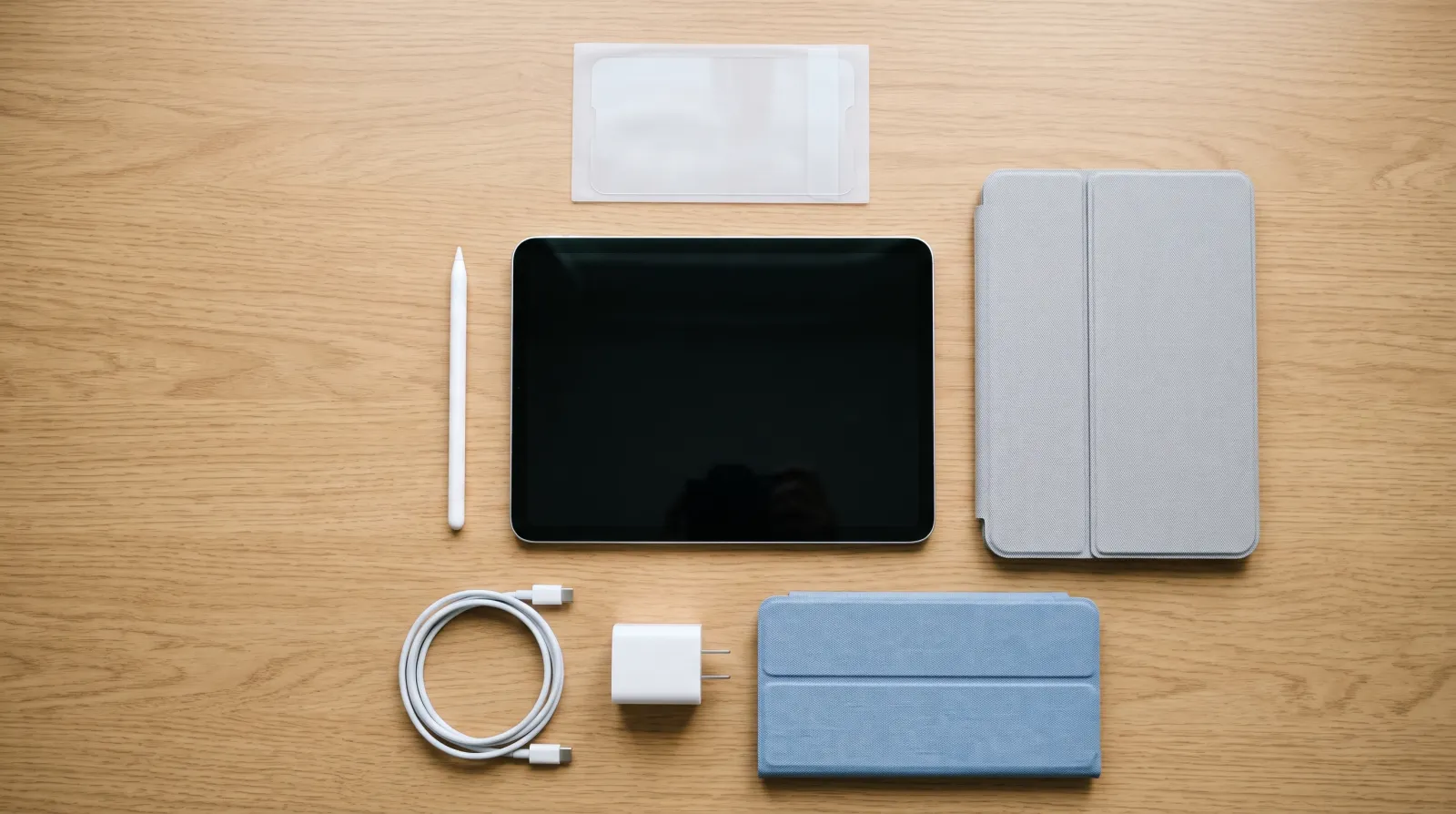
- In the box: the iPad, a 1 m USB-C cable and a 20W USB-C charger. No case, pen or keyboard.
- Pen: the Apple Pencil (USB-C), $79. The Pencil Pro and 2nd generation don’t work.
- Keyboard: Logitech Combo Touch ($159.99 list, $112.33 at Logitech on Nov 26, 2026) or Apple’s Magic Keyboard Folio ($249).
- Case: see our iPad (A16) case guide. Apple’s Smart Folio is $79.
- Protection plan: AppleCare+ is $54.99 a year. Buy it within 60 days.
Don’t have the iPad yet? See the iPad (A16) on Amazon (opens Amazon in a new tab).
What’s in the iPad (A16) box
Apple’s spec page lists three items:
- iPad
- USB-C Charge Cable (1 meter)
- 20W USB-C Power Adapter
So you don’t need to buy a charger. What you do need to add depends on how you use it: a case for almost everyone, a pen for notes and drawing, and a keyboard if you type a lot.
What to look for in iPad (A16) accessories
- The model name. Look for “iPad (A16)” or “iPad 11th gen” in the listing. Apple, Logitech and OtterBox list the same keyboard and cases for the A16 and the 10th gen. Don’t assume a 10th-gen accessory fits unless the maker says so.
- The right Pencil. Only the Apple Pencil (USB-C) and Apple Pencil (1st generation) work, per Apple’s compatibility list. The Apple Pencil Pro and Apple Pencil (2nd generation) are not on Apple’s list for this iPad.
- Smart Connector keyboards. The Magic Keyboard Folio and Logitech Combo Touch connect through the iPad’s Smart Connector, so there’s nothing to pair or charge.
- A slow USB-C port. Apple lists the port as USB 2.0, up to 480Mb/s. Hubs and drives work, but large file copies are slow. Pay for a fast hub only if you need its ports, not its speed.
- Touch ID on top. Touch ID is in the top button, so a case has to leave that button easy to press.
iPad (A16) accessories compared
| Accessory | What it does | Connects by | Price seen |
|---|---|---|---|
| Apple Pencil (USB-C) | Notes, markup, sketching | USB-C cable to pair and charge | $79 at Apple |
| Apple Pencil (1st gen) | Notes, markup, sketching | Needs USB-C to Apple Pencil Adapter | $99 at Apple |
| Logitech Combo Touch | Backlit keyboard case with trackpad and kickstand | Smart Connector | $112.33 at Logitech ($159.99 list) |
| Magic Keyboard Folio | Two-piece keyboard folio, trackpad, 14-key function row | Smart Connector | $249 at Apple |
| Apple Smart Folio | Front and back cover, folds into a stand | Magnetic | $79 at Apple |
| ESR Armorite Pro | Glass screen protector with install tray | Adhesive | $28.99 at ESR |
| AppleCare+ | Accident, theft and loss cover | Plan | $54.99/yr or $5.49/mo |
Scroll sideways to see every column.
Best iPad (A16) accessories
Apple Pencil (USB-C)
For: handwritten notes, marking up PDFs and homework, and casual sketching.
Works with iPad (A16) and iPad (10th gen) · tilt sensitivity · attaches magnetically to the side of the iPad for storage · pairs and charges with a USB-C cable · $79 at Apple (Nov 26, 2026)
Pros
- Cheaper than the 1st-generation Pencil
- Snaps to the iPad’s side so it doesn’t get lost
- No adapter needed
Cons
- Doesn’t charge on the iPad; you plug it in
- Apple doesn’t list pressure sensitivity for it
If you already own a 1st-generation Apple Pencil, it works too, with Apple’s USB-C to Apple Pencil Adapter. Buying new, the USB-C model is $20 cheaper. Cheaper third-party pens and drawing advice are in our tablet stylus guide.
Logitech Combo Touch for iPad (10th gen and A16)
For: students and anyone who types on the iPad most days and wants a case and keyboard in one.
Fits iPad (A16) and iPad (10th gen) · Smart Connector, no pairing or charging · detachable backlit keyboard · multi-touch trackpad · kickstand · $159.99 list, $112.33 at Logitech (Nov 26, 2026)
Pros
- About $137 less than Apple’s keyboard at Logitech’s sale price
- Backlit keys
- Keyboard comes off for reading and video
Cons
- Sale price can change; list price is $159.99
- Logitech doesn’t list an Apple Pencil holder
Apple Magic Keyboard Folio for iPad (A16)
For: buyers who want Apple’s own keyboard and use the function row for shortcuts.
Fits iPad (A16) and iPad (10th gen) · two-piece design with front and back protection · detachable keyboard · scissor keys with 1 mm travel · click-anywhere trackpad · 14-key function row · adjustable stand · $249 at Apple (Nov 26, 2026)
Pros
- Made by Apple for this iPad
- Function row for brightness, volume and shortcuts
- Covered by AppleCare+ for $29 if you add a plan
Cons
- $249 is more than half the price of the 128GB iPad
- Apple doesn’t list backlit keys
Want a cheaper Bluetooth keyboard case, or a keyboard that works with more than one tablet? Our tablet keyboard guide covers those.
Apple Smart Folio for iPad (A16)
For: light protection and a stand for video and FaceTime, if you don’t need a keyboard.
Fits iPad (A16) and iPad (10th gen) · front and back protection · folds into stand positions for reading, viewing, typing and FaceTime · auto wake and sleep · Sky, White, Watermelon or Lemonade · $79 at Apple (Nov 26, 2026)
Pros
- Made by Apple for this iPad
- Auto wake and sleep
- Thin and light
Cons
- Costs more than most third-party folios
- No Pencil holder listed
Cheaper folios, clear-back cases and rugged options are compared in our best iPad (A16) case guide. For a child, see the kid-proof iPad case guide.
Charger and cables
- You already have a 20W charger. It’s in the box, with a 1 m USB-C cable.
- A bigger charger is optional. Apple says a higher-wattage USB-C adapter, such as the one that comes with a Mac laptop, can charge an iPad faster. Its dedicated fast-charge page lists only the iPad Pro (M5), so don’t buy a new charger just for speed.
- A spare is useful. A second 20W USB-C adapter for the bedroom or a travel bag saves unplugging the one by your desk. Find the Apple 20W USB-C Power Adapter on Amazon (opens Amazon in a new tab).
- A longer cable helps if you use the iPad on the couch while it charges. Any USB-C to USB-C cable works for charging.
- You can charge from a computer by plugging the iPad into its USB-C port, per Apple.
Screen protector
A screen protector is optional. It helps most if the iPad lives in a bag or with kids, or if you write a lot with a Pencil and want a less slippery feel.
- Glass: ESR’s UltraFit Armorite Pro is made for the iPad 11-inch (A16), uses Corning accessory glass and comes with an install tray. $28.99 at ESR (Nov 26, 2026). Find ESR Armorite iPad A16 protectors on Amazon (opens Amazon in a new tab).
- Paper-feel: ESR’s Paper-Feel Magnetic protector attaches with magnetic edges, so you can take it off when you watch video. ESR sells separate versions for the A16 and the 10th generation, so pick the A16 one. Our iPad A16 screen protector guide compares it with glass options. Find the ESR Paper-Feel Magnetic protector on Amazon (opens Amazon in a new tab).
- Under a folio: a thin protector keeps the cover closing flat so auto wake and sleep still work.
AppleCare+ for the iPad (A16)
AppleCare+ is sold by Apple, not on Amazon. Here’s what it costs as of November 26, 2026:
- Price: $54.99 a year or $5.49 a month for the iPad. Apple’s plan includes theft and loss.
- Service fees: $29 for a screen repair, $99 for other accidental damage such as a spill, and $129 for theft or loss.
- Accessories: a damaged Apple Pencil or Apple keyboard can be replaced for $29.
- Battery: covered if it holds less than 80% of its original capacity.
- Deadline: buy it within 60 days of buying the iPad, in the Settings app or from Apple.
Is it worth it? On a $449 iPad, one $99 accident repair plus a year of cover costs about $154. It makes the most sense for kids, students and anyone who carries the iPad daily. If the iPad stays home in a sturdy case, many people skip it.
The verdict
The iPad (A16) already comes with a 20W charger and cable. Add a case first. Add the Apple Pencil (USB-C) if you write or draw; it’s the cheaper of the two Pencils that work. For typing, the Logitech Combo Touch is the better value and Apple’s Magic Keyboard Folio is the pricier option. Consider AppleCare+ within 60 days if the iPad will travel or go to a child.
Frequently asked questions
Does the iPad (A16) come with a charger?
Yes, in the US. Apple lists three things in the box: the iPad, a 1-meter USB-C Charge Cable and a 20W USB-C Power Adapter. There is no case, screen protector, Apple Pencil or keyboard.
Which Apple Pencil works with the iPad (A16)?
Two: the Apple Pencil (USB-C), $79 at Apple, and the Apple Pencil (1st generation), $99. The 1st-generation Pencil needs Apple’s USB-C to Apple Pencil Adapter to pair and charge. The Apple Pencil Pro and Apple Pencil (2nd generation) don’t work with it.
Do iPad (10th gen) accessories fit the iPad (A16)?
Many do, but only when the maker says so. Apple’s Magic Keyboard Folio and Smart Folio, Logitech’s Combo Touch and OtterBox’s Symmetry Folio all list both models. Some newer cases, such as ESR’s, are listed for the A16 only. Check the listing before you buy.
Do I need a faster charger for the iPad (A16)?
No. The 20W adapter in the box is enough. Apple says a higher-wattage USB-C adapter, like a Mac laptop charger, can charge an iPad faster, but its fast-charge page lists only the iPad Pro (M5). A spare 20W adapter for a second room or a bag is the more useful buy.
How much is AppleCare+ for the iPad (A16)?
$54.99 a year or $5.49 a month at Apple, as of November 26, 2026. You can add it within 60 days of buying the iPad. Screen repairs cost $29, other accidental damage $99, and theft or loss $129. It also covers a damaged Apple Pencil or Apple keyboard for $29.
Does the Apple Pencil charge when it’s attached to the iPad (A16)?
No. Apple says the Apple Pencil (USB-C) attaches magnetically to the side of the iPad for storage, but it pairs and charges with a USB-C cable. Cases that promise Pencil charging don’t change that on this iPad.
Sources
This guide is based on Apple’s specifications and support pages, accessory makers’ product pages and listed prices. We have not tested these devices ourselves. Specs and prices were checked on November 26, 2026; check Amazon for today’s price.
- Apple: iPad (A16) technical specifications, including what’s in the box (opens in a new tab)
- Apple Store: iPad (A16) and AppleCare+ pricing (checked Nov 26, 2026) (opens in a new tab)
- Apple Support: Apple Pencil compatibility (opens in a new tab)
- Apple Store: Apple Pencil (USB-C), price and compatibility (opens in a new tab)
- Apple Store: Magic Keyboard Folio for iPad (A16) (opens in a new tab)
- Apple Store: Smart Folio for iPad (A16) (opens in a new tab)
- Logitech: Combo Touch for iPad (10th gen and A16) (checked Nov 26, 2026) (opens in a new tab)
- Apple Support: Charge and connect with the USB-C port on your iPad (opens in a new tab)
- Apple Support: Fast charge your iPad (iPad Pro M5 only) (opens in a new tab)
- Apple: AppleCare+ prices, service fees and 60-day purchase window (opens in a new tab)
- ESR: UltraFit Armorite Pro screen protector for iPad 11-inch (A16) (opens in a new tab)
- ESR: Paper-Feel Magnetic Screen Protector for iPad 11-inch (A16) (opens in a new tab)