Home Office
Desk Cable Management: What to Buy in 2026 (Trays, Spines, Ties)
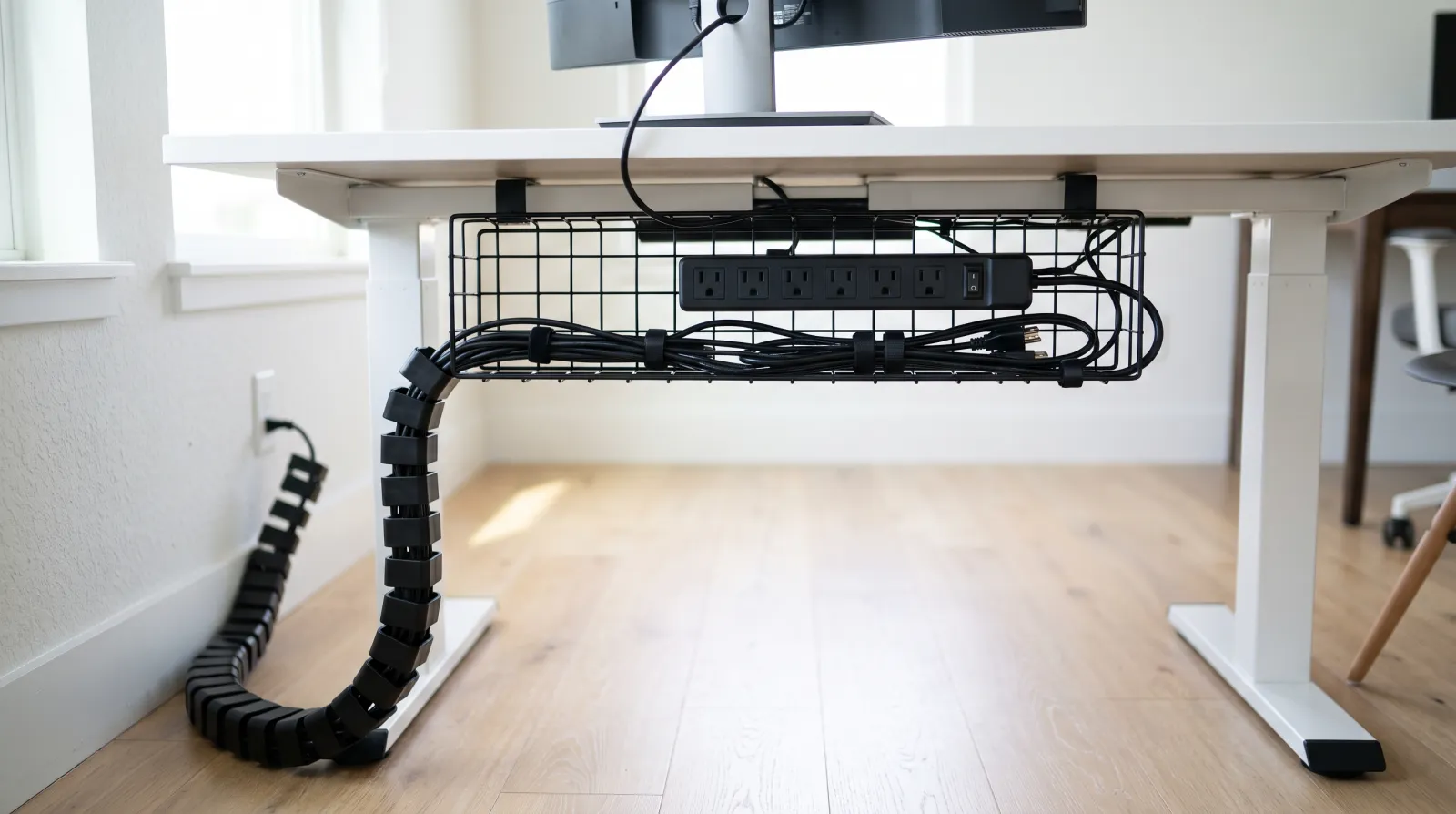
Most desk cable messes are fixed with three things: a tray under the desk, a power strip mounted in it, and a few reusable ties. A standing desk adds one more: a cable spine for the cord that runs to the wall. Here’s what to buy and how to set it up.
As an Amazon Associate, Before You Cart earns from qualifying purchases. Read our affiliate disclosure.
The short answer
- Start here: a VIVO clamp-on tray ($39.99 at VIVO, Nov 27, 2026), no drilling.
- Put this in it: a Belkin 12-outlet surge protector with a 10 ft cord and keyhole slots, $36.99 at Belkin.
- Standing desk: add a VIVO cable spine ($34.99) for the cord to the wall.
- Bundle the rest: VELCRO Brand ONE-WRAP ties, reusable and cheap.
- Total: about $85 for a fixed desk, about $120 for a standing desk.
Plan it in this order
- Cut the cable count first. A monitor arm routes screen cables along the arm, and a USB-C dock turns several laptop cables into one.
- Mount the power strip under the desk. Marlin Steel calls power strip placement the step that decides the rest of the layout. Most strips have keyhole notches on the back: measure between them, set two screws that far apart, and hang the strip.
- Put a tray around it. A tray holds the strip, the power bricks and the extra cable length. Measure your strip first: VIVO’s clamp-on steel tray is 17 inches wide.
- Coil and tie the excess. Measure how much length each cable needs, coil the rest and tie it (Marlin Steel). Label look-alike cables.
- Guide the stragglers. Adhesive clips hold single cables along the desk edge before they join the bundle.
Standing desks: leave enough slack
BTOD says the most common problem is cables that look fine when you sit, then pull tight or unplug when you raise the desk. Its advice:
- Mount the power strip under the desk. Everything on the desk plugs into it, so only one cord travels to the wall.
- Route with the desk all the way up. Do the cable work at the highest height you use, so there’s enough slack when you stand.
- Check the strip’s cord at full height. It has to reach the outlet with the desk raised.
- Buy longer cables if needed. Monitor and USB cables that just reach when sitting may be too short.
- Give the wall cord a path. A cable spine moves with the desk as it goes up and down.
Shopping for the desk itself? See our standing desk guide.
What to buy
VIVO Clamp-on Cable Management Tray (DESK-CM6L-B)
For: renters and anyone who doesn’t want to drill, on fixed or standing desks.
Steel · 17 x 6 x 5.8 in (8.8 in tall with clamps) · clamps desks 0.2 to 2 in thick · screws included as an option · holds 11 lb · 2 in safety lip · 1-year warranty · 30-day returns · $39.99 at VIVO, regular $44.99 (Nov 27, 2026)
Pros
- No drilling
- Holds a power strip plus bricks
- Clamp or screw mounting
Cons
- 11 lb limit
- Check that your strip fits in 17 in
Cheaper: VIVO’s basic under-desk tray (DESK-AC06-1C) starts at $19.99 at VIVO (Nov 2026) if you don’t need clamps. Longer desk: VIVO’s clamp-on fabric tray (DESK-AC16F-C) comes in 16, 31 and 47 inch lengths, holds 11 lb, and the 16 inch size is $29.99; it hangs 6.25 to 9.25 inches below the desk, so check your knee room. Find the VIVO DESK-AC06-1C tray on Amazon (opens Amazon in a new tab) or the VIVO fabric tray (opens Amazon in a new tab).
Upgrade: BTOD likes the Humanscale NeatTech tray (about $138), which installs with two clips and drops down for access, but it fits average-size desks only.
Belkin 12-Outlet Surge Protector (BE112234-10)
For: a full desk of gear on one strip that hangs from two screws.
12 outlets (6 spaced for bulky plugs) · 10 ft cord · right-angle plug · two keyhole mounting slots · about 4,000 joules · phone, Ethernet and coax protection · 13.5 in long · lifetime warranty and $300,000 connected equipment warranty · $36.99 at Belkin (Nov 27, 2026)
Pros
- 10 ft cord reaches the wall from a raised desk
- Keyhole slots for mounting
- Fits a 17 in tray
Cons
- 13.5 in long, needs a full-size tray
- Overkill for a laptop-only desk
Small setup? CyberPower’s P406U has 4 outlets, 2 USB-A ports, 500 joules, a 6 ft braided cord and keyhole slots for mounting under a desk. Find the CyberPower P406U on Amazon (opens Amazon in a new tab).
VIVO Clamp-on Vertebrae Cable Management Kit (DESK-AC01P-B)
For: the cord that runs from a standing desk to the wall.
4 ft spine · clamps desks 0.4 to 2 in thick, or screws into desks at least 1 in thick · links open from four sides · removable sections to set the length · 5 in steel base · black or white · 3-year warranty · $34.99 at VIVO, regular $39.99 (Nov 27, 2026)
Pros
- Flexes as the desk rises and lowers
- Add cables from any side
- No drilling needed
Cons
- A VIVO site reviewer found the base light under tension
- Plastic links
VIVO also sells a version without the clamp (DESK-AC01C) from $34.99. BTOD’s alternative for the wall cord is to run it down the back of the desk leg nearest the outlet under an adhesive cord cover.
VELCRO Brand ONE-WRAP Ties
For: bundling coils and cable runs you may want to change later.
Hook-and-loop ties that wrap onto themselves · reusable and adjustable · thread one end through the slot to anchor the tie to a cable · Heavy Duty ties for thick cords · rolls you cut to length · about $6.50 for a 50-pack at Target and Walmart (Nov 2026)
Pros
- Reusable, unlike zip ties
- Anchors to the cable so it won’t get lost
- Cheap
Cons
- Visible unless tucked in the tray
BTOD notes that zip ties hold well and cost less, but you have to cut them every time you rearrange.
Clips, sleeves and cord covers
- Starter kit: BTOD’s best value pick is a roughly $15 kit of adhesive clips, ties, sleeves and a hook-and-loop roll. It won’t hide a big power strip, so pair it with a tray. Find desk cable management kits on Amazon (opens Amazon in a new tab)
- Cable sleeve: Marlin Steel suggests zip-up sleeves to bundle cables that run together. Best on a fixed desk or for the bundle that stays with the desktop. Find zip-up cable sleeves on Amazon (opens Amazon in a new tab)
- Cord cover: for a cord along a wall or a fixed desk leg, Legrand’s Wiremold CordMate II kit includes 12 ft of self-adhesive, paintable channel in three 4 ft pieces, with elbows, couplings and a T-fitting. Find the Wiremold CordMate II kit on Amazon (opens Amazon in a new tab)
The verdict
Buy the VIVO clamp-on tray and hang a Belkin 12-outlet surge protector in it, then tie up the extra length with VELCRO ONE-WRAP ties. That clears the floor on almost any desk for about $85. On a standing desk, add the VIVO cable spine for the cord to the wall, and do the routing with the desk at its highest setting.
Frequently asked questions
What is the best way to hide cables under a desk?
Mount a tray under the back edge of the desk, put a power strip in it, and plug everything on the desk into that strip. Then only one cord runs from the desk to the wall. BTOD and Marlin Steel both recommend starting with the power strip, then bundling the rest with reusable ties or a sleeve.
How do you manage cables on a standing desk?
Mount the power strip under the desk so everything moves with the desktop, and run the single cord to the wall through a cable spine. BTOD’s advice: route your cables with the desk raised to the highest height you use, so nothing pulls tight when you stand, and check that the power strip’s cord reaches the outlet at full height.
Do I need to drill into my desk for a cable tray?
No. Clamp-on trays such as VIVO’s DESK-CM6L-B grip the back edge of the desktop. VIVO lists it for desks 0.2 to 2 inches thick and rates it for 11 lb. If you screw a tray or strip to a desk you own, Marlin Steel’s tip is to use screws short enough that they don’t poke through the top.
How long should the power strip cord be for a standing desk?
Long enough to reach the outlet with the desk at its highest setting, with some slack left over. Measure from the tray to the outlet with the desk raised. A strip with a 10-foot cord, like Belkin’s 12-outlet BE112234-10, covers most setups.
Are cable sleeves good for standing desks?
They work for the bundle that stays with the desk, but a cable spine is built for the run that has to flex as the desk goes up and down. A sleeve is also slower to change, since adding a cable means opening it up.
Sources
This guide is based on maker product pages and published buying advice from BTOD and Marlin Steel. We have not tested these products ourselves. Specs and prices were checked on November 27, 2026; check Amazon for today’s price.
- BTOD: Top desk cable management products at every price (Sep 27, 2026) (opens in a new tab)
- Marlin Steel: The 5-step guide to under-desk cable management (opens in a new tab)
- VIVO: Clamp-on cable management tray DESK-CM6L-B (price checked Nov 27, 2026) (opens in a new tab)
- VIVO: Clamp-on fabric cable management tray DESK-AC16F-C (opens in a new tab)
- VIVO: Clamp-on vertebrae cable management kit DESK-AC01P-B (opens in a new tab)
- VIVO: Cable management collection and prices (checked Nov 27, 2026) (opens in a new tab)
- Belkin: 12-outlet surge protector BE112234-10 (opens in a new tab)
- CyberPower: P406U surge protector (opens in a new tab)
- VELCRO Brand: ONE-WRAP ties (opens in a new tab)
- Legrand: Wiremold CordMate II kit (opens in a new tab)